On-Page SEO Checklist: 20 Steps to Optimize Every Page
You can’t control who links to you or when Google updates its algorithm. But you have full control over every word, heading and image on your pages. That makes on-page SEO the fastest, most reliable way to improve your rankings.
This on-page SEO checklist walks you through 20 steps, from keyword targeting to schema markup. Use it before you publish any new page, and run older pages through it to unlock quick wins.
An on-page SEO checklist covers keyword targeting, title tags, meta descriptions, URLs, headings, content quality, search intent, images, internal and external links, schema markup and user experience. Optimize each element around one primary keyword and the searcher’s intent.
What Is On-Page SEO?
On-page SEO is the practice of optimizing the content and HTML elements of individual web pages so they rank higher and attract more relevant traffic. It includes titles, headings, body content, images, internal links and structured data.
It differs from technical SEO, which covers site-wide infrastructure (see our technical SEO checklist), and off-page SEO, which covers signals from other websites, like backlinks.
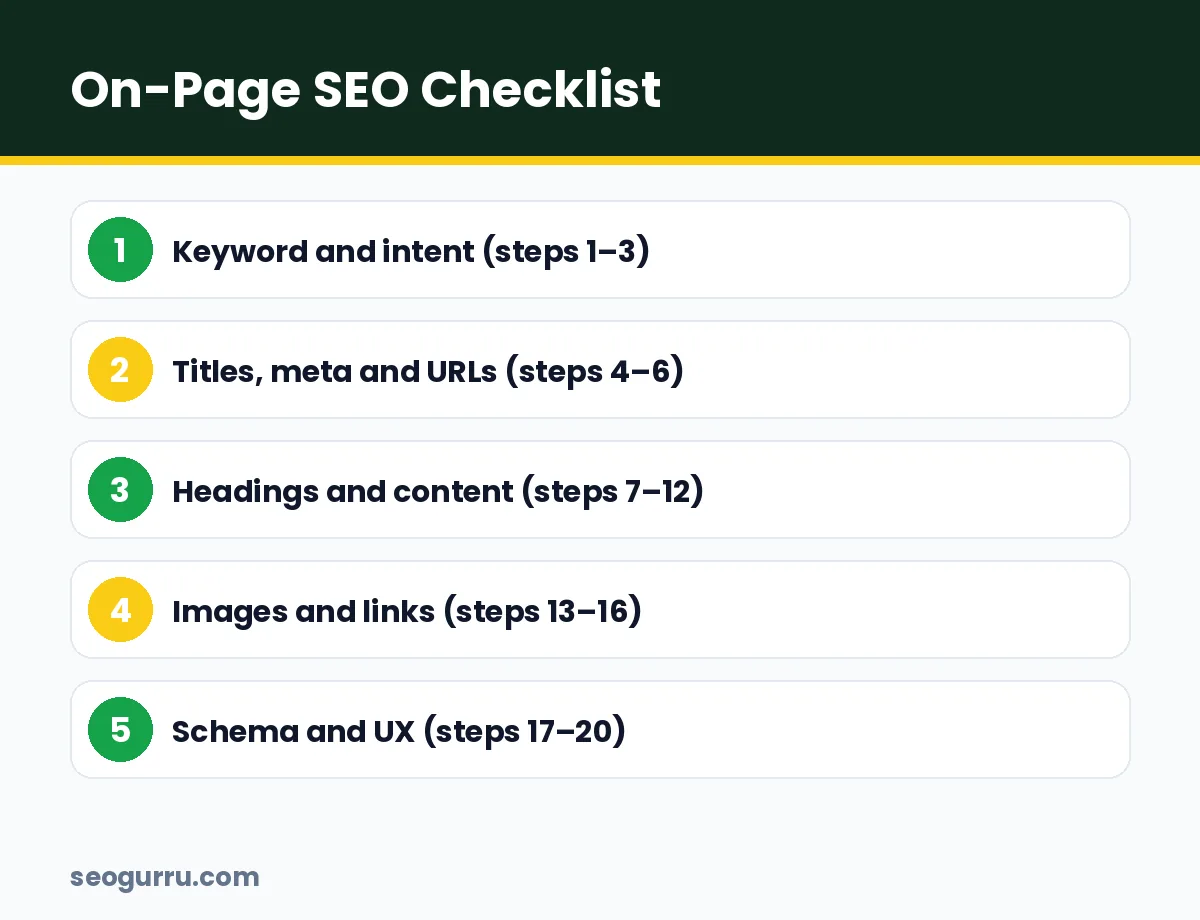
Keyword and Intent
1. Choose one primary keyword per page
Each page should target one main keyword and a cluster of related terms. Two pages targeting the same keyword compete with each other (keyword cannibalization). Our keyword research guide explains how to choose.
2. Match search intent
Google the keyword and study the top results. Are they guides, product pages, comparisons or tools? Match the dominant format. A product page won’t rank for an informational “how to” query.
3. Map secondary keywords and questions
List related terms, synonyms and questions from People Also Ask. Use them naturally in subheadings and body copy to cover the topic fully.
Titles, Meta Descriptions and URLs
4. Write a compelling title tag
- Include the primary keyword, ideally near the start
- Keep it under about 60 characters to avoid truncation
- Make it click-worthy with a benefit, number or year
Example: “On-Page SEO Checklist: 20 Steps to Rank Every Page”
5. Write a meta description that earns clicks
Meta descriptions don’t directly affect rankings, but they influence click-through rate. Keep them around 140–155 characters, include the keyword, and promise a clear benefit.
6. Use a short, descriptive URL
Use lowercase words separated by hyphens, include the keyword and drop filler words.
- Good:
/on-page-seo-checklist/ - Bad:
/blog/2026/10/28/the-ultimate-complete-on-page-seo-checklist-for-beginners-post-id-4821/
Headings and Content
7. Use one H1 that matches the topic
Your H1 should clearly describe the page and include the primary keyword. Most themes use the post title as the H1 automatically.
8. Structure with H2 and H3 headings
Use H2s for main sections and H3s for subsections. Headings help readers scan and help search engines understand your page structure.
9. Put the keyword in the first 100 words
Mention your primary keyword early and naturally so readers and search engines immediately know what the page covers.
10. Write helpful, original content
Google’s systems reward content created for people. Add first-hand experience, examples, data and opinions that don’t exist elsewhere. Thin, rewritten content rarely ranks for long.
11. Answer questions directly
Give clear, 40–60 word answers to key questions under question-style headings. This helps you win featured snippets and AI citations.
12. Improve readability
- Short paragraphs of two to four sentences
- Bullets, numbered lists and tables
- Simple words and active voice
- A Flesch Reading Ease score of around 60 or higher for general audiences
Images and Links
13. Optimize image file names and alt text
Use descriptive file names (on-page-seo-checklist.webp) and alt text that describes the image for people using screen readers. Include keywords only when they describe the image naturally.
14. Compress images and use modern formats
Convert to WebP or AVIF, resize to display dimensions and lazy-load images below the fold. Faster pages rank and convert better.
15. Add internal links
Link to related pages using descriptive anchor text, and link back to this page from relevant older content. See our internal linking strategy for a full framework.
16. Link to authoritative external sources
Citing trusted sources, such as Google Search Central, builds credibility and helps readers verify your claims.
Schema and User Experience
17. Add schema markup
Use Article, FAQPage, HowTo, Product or LocalBusiness markup where relevant. Learn the basics in our schema markup guide.
18. Make the page mobile-friendly
Check that text is readable, buttons are tappable and nothing overflows the screen on a phone.
19. Improve page experience
Pass Core Web Vitals, avoid intrusive pop-ups and keep layouts stable while loading. Our Core Web Vitals guide covers the details.
20. Add a clear call-to-action
Every page should guide readers to a next step: read a related guide, subscribe, request a quote or contact you.
- One page, one primary keyword, one clear intent.
- Titles and meta descriptions win the click; content wins the ranking.
- Re-optimize older pages with this checklist for fast results.
On-Page SEO Example: Before and After
| Element | Before | After |
|---|---|---|
| Title | Our Services | Emergency Plumber in Austin, TX – 24/7 Service |
| URL | /page-id-17 | /emergency-plumber-austin/ |
| H1 | Welcome! | 24/7 Emergency Plumber in Austin |
| Intro | Generic company history | Answer: response times, areas, pricing |
| Images | IMG_2231.jpg, no alt | austin-emergency-plumber.webp with alt |
| Schema | None | LocalBusiness + FAQPage |
Small changes like these often lift rankings and click-through rates within weeks.
How to Use This Checklist on Existing Pages
Start with pages that already rank in positions 5–20 in Google Search Console. They have proven relevance, so small on-page improvements often move them onto page one. Review each page against the 20 steps, fix the gaps, request indexing in Search Console, and compare clicks and average position after four weeks.
On-Page SEO for AI Search
AI Overviews, ChatGPT and Perplexity pull passages from well-optimized pages, so good on-page SEO now does double duty. A few extra habits help your pages get cited:
- Lead each section with a direct answer before adding detail
- Use specific numbers and facts instead of vague claims
- Show the author with a short bio that explains their experience
- Show “last updated” dates and refresh key pages regularly
- Use tables for comparisons so AI tools can extract them cleanly
These habits make your content easier for people to skim too, so they’re worth adopting on every page. Learn more in our guide to answer engine optimization.
Common On-Page SEO Mistakes
- Duplicate title tags across many pages, often caused by templates
- Missing or multiple H1s, which confuse page structure
- Keyword stuffing in headings and alt text
- Walls of text with no subheadings, lists or images
- No internal links, leaving new pages isolated
- Ignoring old content that could rank with a quick refresh
- Forgetting the CTA, so traffic arrives but never converts
Run a crawl with Screaming Frog or a site audit tool to catch the template-level issues across your whole site at once.
Frequently Asked Questions
What are the most important on-page SEO factors?
The most important on-page SEO factors are matching search intent, high-quality helpful content, an optimized title tag, a clear heading structure, internal links, fast page speed and mobile usability. Together, these help search engines understand and trust your page.
How many keywords should I target per page?
Target one primary keyword per page, supported by a handful of closely related secondary keywords and questions. This keeps the page focused and prevents multiple pages from competing for the same term.
Does keyword density still matter?
Not as a strict formula. Use your primary keyword naturally in the title, H1, first paragraph and a few headings, then write for readers. Overusing keywords can make content read poorly and may be treated as spam.
How long does on-page SEO take to work?
After Google recrawls an optimized page, you can see ranking changes within a few days to a few weeks. Bigger gains depend on competition, site authority and how much the page improved.
Conclusion
On-page SEO is where every ranking starts. Choose one keyword, match intent, write a strong title and meta description, structure your content clearly, optimize images, add links and finish with schema and a clear CTA.
Bookmark this checklist and use it on every page you publish. Want experts to optimize your key pages? Our on-page SEO services and content optimization team can help, or get started with a free SEO analysis.